Process-PSModule#
An end-to-end PowerShell module pipeline that automates the entire lifecycle of a module: building from source, running cross-platform tests, enforcing code quality and coverage, generating documentation, and publishing the versioned module to the PowerShell Gallery and its documentation site to GitHub Pages. It is the core workflow used across all PowerShell modules in the PSModule organization, ensuring reliable, automated, and maintainable delivery of PowerShell projects.
| Page | Description |
|---|---|
| Spec | Requirements for Process-PSModule — an end-to-end PowerShell module pipeline that guarantees build, testing, quality gates, documentation generation, and versioned publication to package and docs registries. |
| Design | How Process-PSModule delivers the spec — a single reusable GitHub Actions workflow composing sub-workflows, a settings file contract, and the scenario matrix. |
| Pipeline stages | The job-by-job breakdown of the Process-PSModule workflow, from Plan through Publish Docs. |
| Usage | How to call the Process-PSModule workflow — inputs, secrets, permissions, the scenario matrix, and important-file change detection. |
| Configuration | The Process-PSModule settings file — every available setting, the full defaults, and worked examples for coverage, rapid testing, linting, and release notes. |
| Skipping framework tests | How to skip individual PSModule framework tests on a per-file basis, the available test IDs, and the broader configuration alternatives. |
| Repository structure | The repository and module source layout Process-PSModule expects, and how to declare module dependencies with #Requires -Modules. |
| Principles and practices | The versioning, branching, and colocation principles behind Process-PSModule, and the development practices it is compatible with. |
How to get started#
- Create a repository from the Template-Module.
- Configure the repository:
- Enable GitHub Pages in the repository settings. Set it to deploy from GitHub Actions.
- This will create an environment called
github-pagesthat GitHub deploys your site to.Within the
github-pagesenvironment, remove the branch protection formain.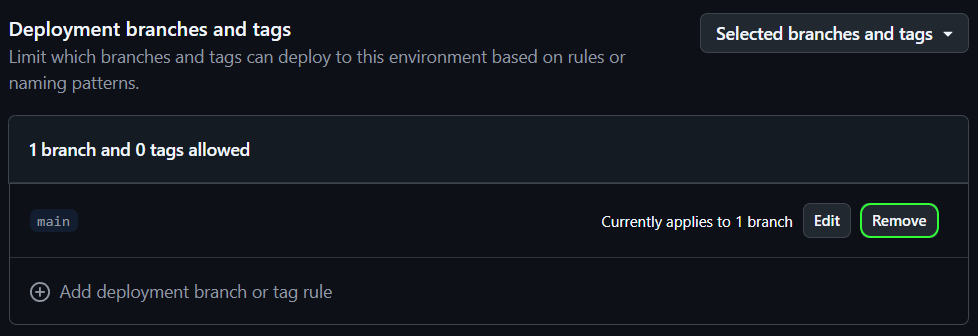
- Create an API key on the PowerShell Gallery. Give it permission to manage the module you are working on.
- Create a new secret called
APIKEYin the repository and set the API key for the PowerShell Gallery as its value. - If you are planning on creating many modules, you could use a glob pattern for the API key permissions in PowerShell Gallery and store the secret on the organization.
- Clone the repo locally, create a branch, make your changes, push the changes, create a PR and let the workflow run.
- Adding a
Prereleaselabel to the PR will create a prerelease version of the module. - Use
.github/zensical.tomlfor site generation. Process-PSModule builds documentation with Zensical from this file. - When merging to
main, the workflow automatically builds, tests, and publishes your module to the PowerShell Gallery and maintains the documentation on GitHub Pages. By default the process releases a patch version, which you can change by applying labels likeminorormajoron the PR to bump the version accordingly.
How it works#
Everything is packaged into this single workflow to simplify full configuration of the workflow via this repository. Simplifying management and operations across all PowerShell module projects. A user can configure how it works by simply configuring settings using a single file.
Workflow overview#
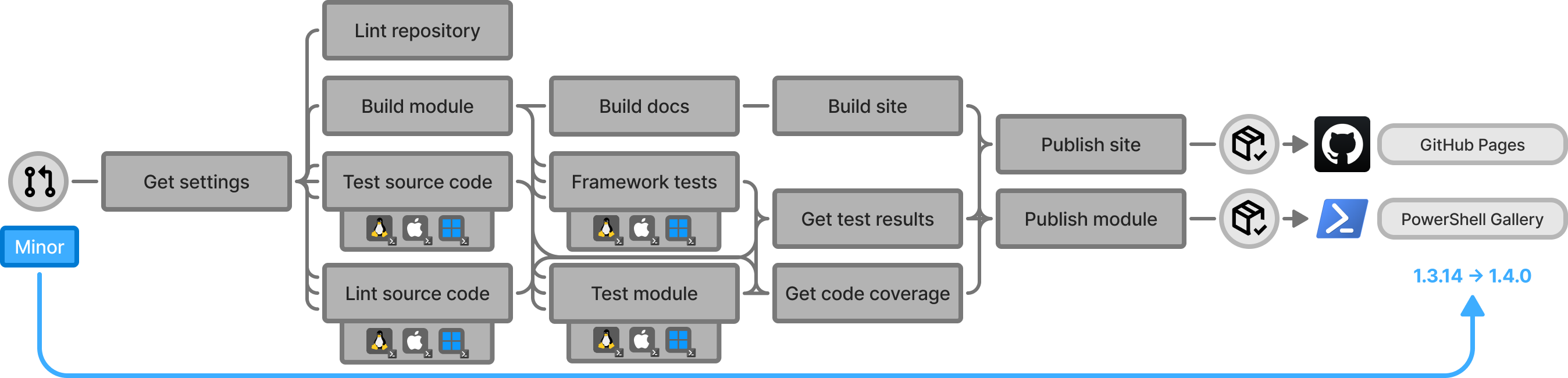
The workflow is designed to be triggered on pull requests to the repository's default branch. When a pull request is opened, closed, reopened, synchronized (push), or labeled, the workflow will run. Depending on the labels in the pull requests, the workflow will result in different outcomes.
Reference#
The spec and design own the what and how. The pages below are reference documentation for those who implement, configure, and operate the workflow.
Process-PSModule composes its work from reusable workflows, actions, a container image, PowerShell modules, and Python packages. For the full dependency tree, including diagrams and a reference of every dependency, see DEPENDENCIES.md.
| Page | Description |
|---|---|
| Pipeline stages | The job-by-job breakdown of the Process-PSModule workflow, from Plan through Publish Docs. |
| Usage | How to call the Process-PSModule workflow — inputs, secrets, permissions, the scenario matrix, and important-file change detection. |
| Configuration | The Process-PSModule settings file — every available setting, the full defaults, and worked examples for coverage, rapid testing, linting, and release notes. |
| Skipping framework tests | How to skip individual PSModule framework tests on a per-file basis, the available test IDs, and the broader configuration alternatives. |
| Repository structure | The repository and module source layout Process-PSModule expects, and how to declare module dependencies with #Requires -Modules. |
| Principles and practices | The versioning, branching, and colocation principles behind Process-PSModule, and the development practices it is compatible with. |